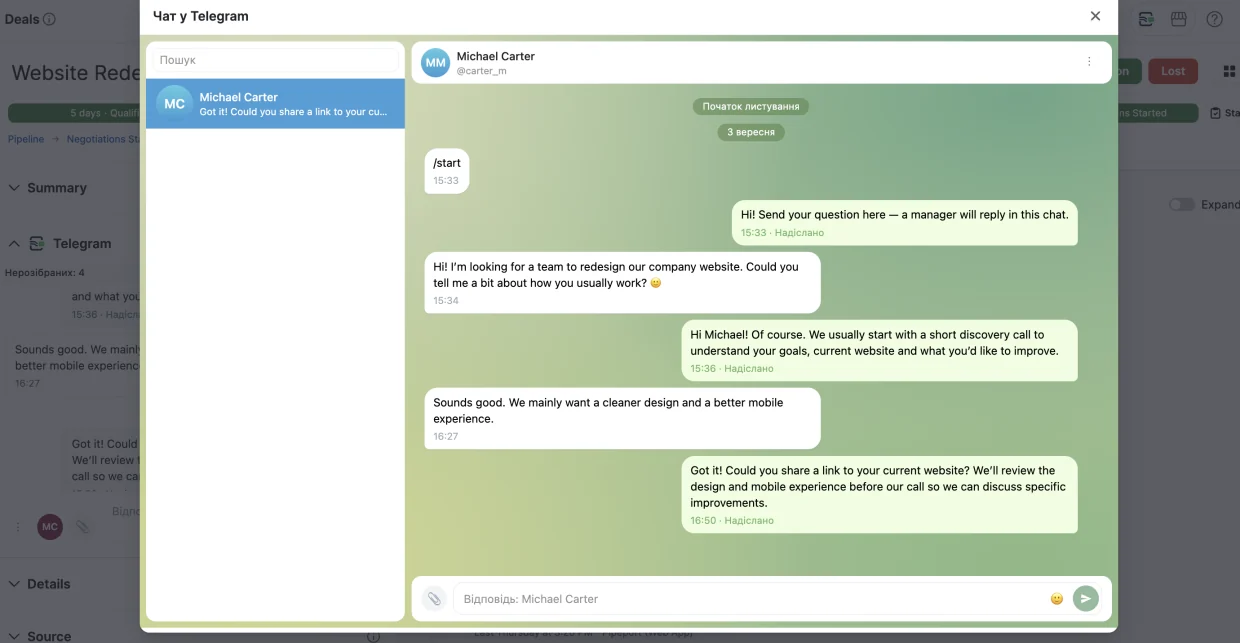
Відповідайте з картки контакту або угодиReply from contact and deal records
Менеджер бачить повідомлення клієнта та відповідає на них безпосередньо з Pipedrive.Managers can read customer messages and reply directly from Pipedrive.

Підключіть Telegram та працюйте з клієнтськими діалогами з карток контактів і угод — без перемикання між CRM і месенджером.Connect Telegram and manage customer conversations from Pipedrive contact and deal records, without switching between the CRM and messenger.
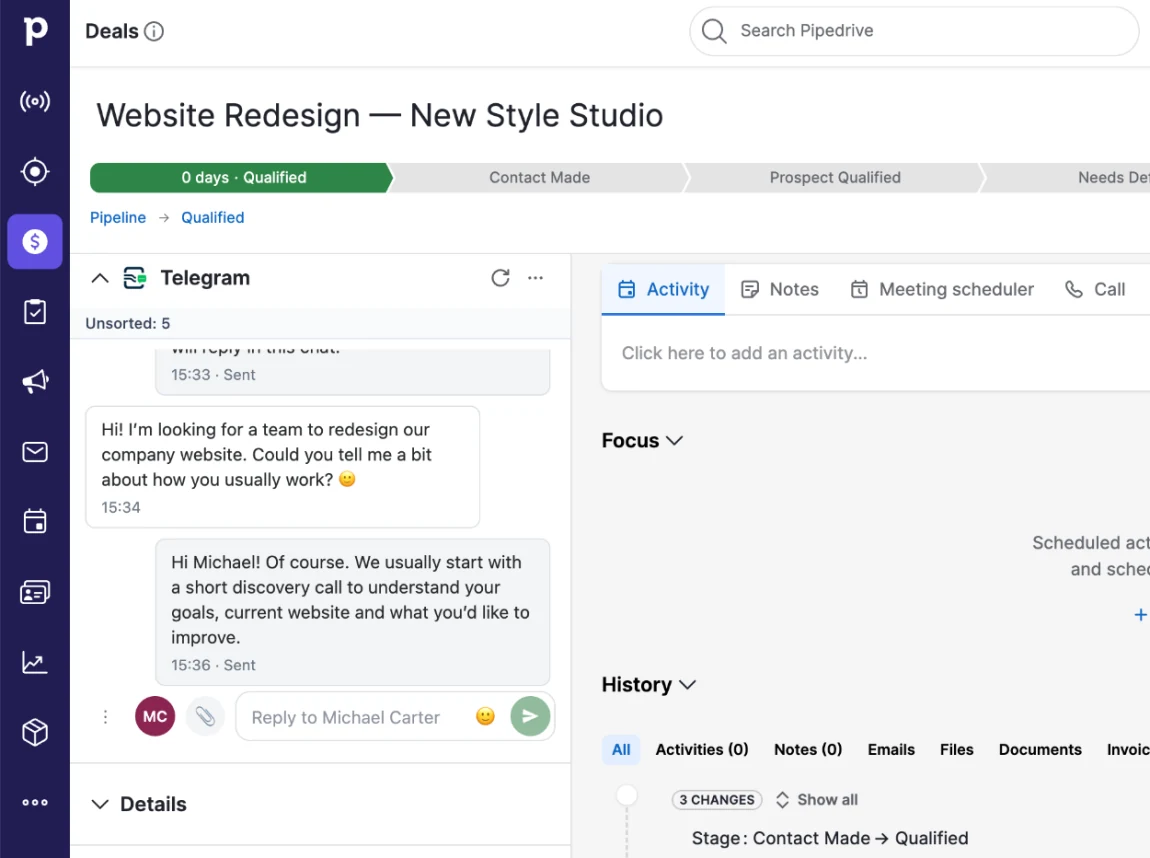
PipePort Chat об’єднує Telegram-листування та прив’язку діалогу до клієнта в одному робочому процесі.PipePort Chat brings Telegram conversations and customer linking into one Pipedrive workflow.
Менеджер бачить повідомлення клієнта та відповідає на них безпосередньо з Pipedrive.Managers can read customer messages and reply directly from Pipedrive.
Зв’яжіть діалог з існуючим CRM-контактом або створіть новий, якщо клієнта ще немає в базі.Connect a conversation to an existing contact or create a new one when the customer is not in Pipedrive yet.
Для чату з непрочитаним повідомленням PipePort Chat може створити активність у Pipedrive та закрити її автоматично після прочитання.For a chat with unread messages, PipePort Chat can create a Pipedrive activity and close it automatically once the conversation is read.
Клієнт першим надсилає повідомлення Telegram-боту. Це обмеження Telegram Bot API: бот не може розпочати діалог самостійно.The customer sends the first message to the Telegram bot. This is a Telegram Bot API limitation: the bot cannot start the conversation.
Новий діалог з’являється в PipePort Chat, а менеджер продовжує спілкування з картки контакту або угоди.The conversation appears in PipePort Chat, and the manager continues it from the deal or contact record.
Прив’яжіть діалог до існуючого контакту або створіть новий. Неприв’язані чати залишаються в окремому списку, доки команда їх не опрацює.Link the conversation to an existing contact or create a new one. Unlinked conversations stay in a dedicated list until your team processes them.
Після прив’язки текст повідомлень додається до картки контакту як нотатки, щоб історія спілкування залишалася в Pipedrive.Once linked, message text is added to the contact record as notes, so the conversation history stays in Pipedrive.
Читайте історію та відповідайте клієнту без переходу в Telegram.Read the conversation and reply without opening Telegram.
Нові діалоги, які ще не пов’язані з CRM, зібрані в окремому списку для подальшої обробки.New conversations that are not linked to CRM yet are collected in a dedicated list for your team to review.
Відкривайте розмови у великому робочому вікні та використовуйте пошук по чатах.Open conversations in a larger workspace and search across chats.
Надсилайте та отримуйте підтримувані вкладення безпосередньо в чаті.Send and receive supported attachments directly in the conversation.
Створюйте посилання на бота безпосередньо з картки контакту або угоди та надсилайте його клієнту будь-яким зручним каналом.Create a bot invite link from a contact or deal record and send it to the customer through any channel.
Базове підключення складається з чотирьох кроків.The basic setup takes four steps.
Додайте застосунок із Pipedrive Marketplace.Add the app from the Pipedrive Marketplace.
Відкрийте @BotFather, створіть бота та скопіюйте токен.Open @BotFather, create your bot and copy its token.
Вставте токен у налаштуваннях PipePort Chat і дочекайтеся підтвердження підключення.Paste the token into PipePort Chat settings and wait for the connection confirmation.
Створіть посилання з картки контакту або угоди. Після того як клієнт відкриє його та натисне Start, чат з’явиться в Pipedrive.Create a link from a contact or deal record. Once the customer opens it and presses Start, the conversation appears in Pipedrive.
План PipePort Chat застосовується до підключеного Telegram-бота, а не до кількості користувачів Pipedrive.Your PipePort Chat plan applies to the connected Telegram bot, not to the number of Pipedrive users.
Після завершення пробного періоду — платний план PipePort Chat.After the trial, continue on the paid PipePort Chat plan.
Встановіть застосунок, підключіть Telegram-бот і продовжуйте клієнтські діалоги безпосередньо в CRM.Install the app, connect your Telegram bot and continue customer conversations directly in the CRM.